
$164.14
Add to Cart
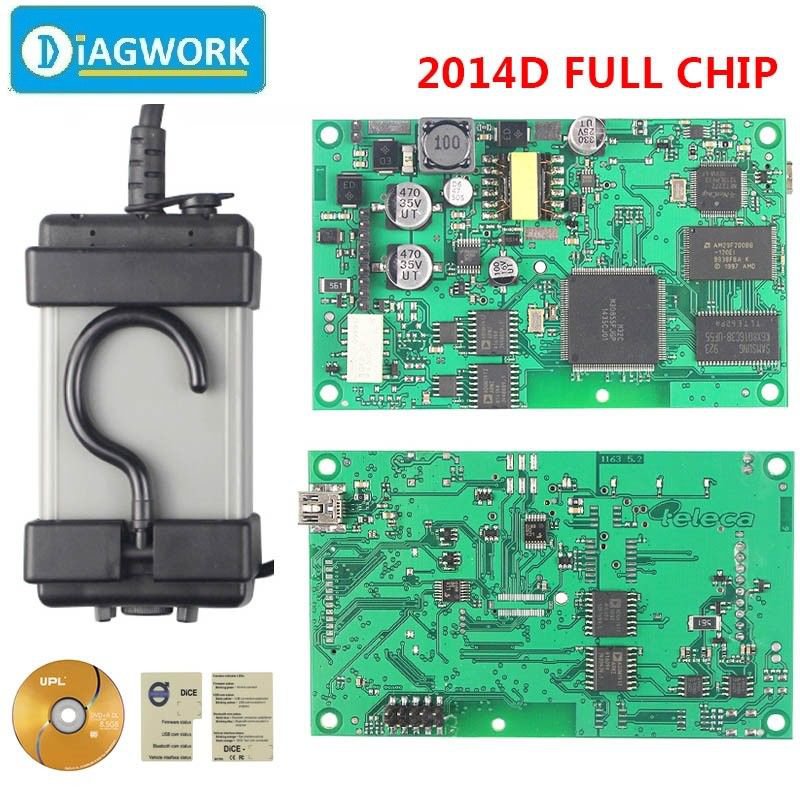
For Volvo Vida Dice 2014D Pro+ Car Scanner Full Chip Green Board Multi-Language
More than 10 available
Details
Shipping: Australia: free (more destinations)
Condition: Brand new
*The store has not been updated recently. You may want to contact the merchant to confirm the availability of the product.


For Volvo Vida Dice 2014D Pro+ Car Scanner Full Chip Green Board Multi-LanguageDescriptionPlease Note:1. If your CD was broken or can't readable, please contact us for software download link. DO NOT OPEN DISPUTE OR GIVE NEGATIVE FEEDBACK!2. Recommended PC system: Windows 7 Pro (32Bit Is Better) system with Internet Explorer IE9 or above and NET.Framework 3.5. Do not support XP or Win7 Home system!3. Before install the software, please remeber to shut down your anti-virus software, Or it will be no bad effect on your laptop !4. Our Vida Dice scan tool is used together with VIDA all-in-one to communicate with the vehicle. WE DO NOT SELL STUPID VIDA DICE which resvised from J2534, because that do NOT supports full functions and update.5. Remember to run the file EnableIEHostingx86.reg for 32bit systems or EnableIEHostingx64.reg for 64 bit system. The files can be found in the folder INSTALL->Utils. Just run these file as administrator So " Communication Tool " ( DICE CONFIGURATION ) will be OK !6. Our Vida Dice do not support Bluetooth function. it communicate via USB. The User Name is: 1 or admin7. Software must install on C Drive with 40G spare space. 8. We will offer Best After-Sale service for you as we have much professional experience for solving the problems. The Green PCB Board & Full Chip For VOLVO VIDA DICE: Features:1. Firmware: Full Chip. Software: Newest 2014D 2. Support languages: English,French,Portuguese,Spanish,Swedish 3. Support System : Win 7 32bit / 64bit 4. Updated by link or Email5. Support For Vol-vo cars from 1999-2015, but can not support new XC90 Doip6. Can do control modules, SRS, general safety, brakes, airbag, engine as well as service and maintenance. For Volvo Vida Dice (DIagnostic Communication Equipment) is a tool that is used together with VIDA All-in-one sw to diagnose and troubleshoot for Volvo vehicles from and including model year 1999. This is the latest for Volvo tool to replace the well-known VCT2000 device. For Volvo Vida Dice is connected to the vehicle's OBD diagnostic socket. When connecting to the vehicle, DICE is powered as long as the battery is charged. Device has a folding hook that is designed for hanging the unit from one of the grab handles in the vehicle for example. For Volvo Vida Dice is equipped with four status LEDs that indicate the status of the sw, the USB communication and the interface to the car. Also there is a DC input where a battery cable or adaptor (12V) can be connected, it is used when upgrading and troubleshooting the DICE device. Features of vida dice diagnostic: Fault-tracingGeneral diagnostics and testsDiagnostic trouble codes and associated proceduresSymptom-related diagnostic proceduresWiring diagramsRepairGeneral safety informationGeneral informationComponent locationService programsRemoval, replacement and installationOverhaul instructionsCleaning, Inspection and AdjustmentInstallation instructions, accessories Parts catalogueProduct specificationVisual identificationDesign and functionSpecifications, electrical/electronicSpecifications, mechanicalMechanical schematics and diagramsGas, Vacuum and Fluids Schematics/Diagrams BulletinsGeneral Information BulletinsManual Update BulletinsProduct Fix/Special Tool BulletinsRecall/Service Campaign BulletinsEmission Recall Campaign BulletinsService Manager BulletinsParts/Accessories BulletinsWB, mechanical tools Requirement on Computer for vida dice diagnostic:It must be windows 7 Professional operating systemIt need to be Internet Explorer 9Computer memory need over 3GRAMC:// must have 40GB spaceSW must install on C://It must be NTFS format Packing List :DICE deviceOBD-II cableUSB A to MINI USB angled cableDVD Installation tips:My link has attched clear video instruction, pls follow the video .Some important Installation Steps Shows :---User Name: 1 ---USB Driver installed successfully Display : ---Device And PC Communicate Successfully Display : ---Device Connect Car Successfully Display : ---Vehicle Details Display : ---Fault Trace Display : Useful FAQ :Q: If you met this problem like below picture. You can follow these steps. A: Just run the file EnableIEHostingx86.reg for 32bit systems or EnableIEHostingx64.reg for 64 bit system. The files can be found in the folder INSTALL->Utils. Just run these file as administrator and everything works fine now!Q:When I install Volvo Vida software,it has anerror”Security OK but Vida not OK”. How to solve the problem?A:You need install it on Win7 32bit computer.Q:Does Vida Dice have the function of coding programming ?Is it possible to change the language in instrument cluster?A:No, it is a full scanner for old and new Volvo car, but it cannot do program or change language.Q:I’m using Vida 2014D with Dice, and I’m curious about in which module I can change the “Automatic locking by speed” feature?A:You need to be able to read/write both DIM and ICM flash memories.You have two options. Either make the reload at local Volvo dealer or someone who has an autologic interface. You could also buy some interface that is able to read/write DIM but not ICM.Q: When I use Avdi with Volvo Vida, I have problem to communicate with all modules in car.Some modules like ECU,TCUare not in networks, but I have connection with climate control, CEM and front doors etc.In network screen I have ECU and TCU red and a text no communication. Besides,I also have problems with Avdi software.A:We know that Vida Dice is a J2534-2compatible, whereas Avdi is only a J2534-1 compatible, which causes no communication with all modules. I’m using a Vida Dice clone and my clone is full chip 1:1 as genuine one. I started with 2008 Vida versions and I was upgraded one by one to the 2014d version now.Q: When I go Vida all-in-one after I input the password ADMIN, it does not accept anything.A: Please install “Vida_patch”, after complete installation, restart the computer, then it will accept. Payment 1. We only accept PayPal. 2. Payments must be made within 5 days after product ends. 3. Otherwise eCRATER will open Unpaid Item case automatically later.Shipment1.We ship the package within 2 business days after confirmation of your order and verification of your payment. 2.We ship to worldwide. 3.The shipment usually takes15-35 business days,some areas will take a little longer. ( Except Saturday and Sunday) Because Post mail processing center, your customs and your local mail processing center. Out of our Control! 4.Please check the following estimated shipping From Shenzhen to your country: USA: 15~30 days UK: 15~30 days Canada: 15~35 days About 10~60 Work Days for different Country! Hope you can understanding!ReturnsWe do our best to service our each customer the best that we can. We will refund you for items returned within 14 days of you receiving them. A full Refund will be given if items are returned in their original condition. (Or at buyer's choice can be replaced or exchanged), Merchandise which is damaged or missing components is not refundable. Buyers are responsible for return shipping with proper packaging. On receiving items, we will refund you immediately.WarrantyWe provide 1 year warranty. Buyers are only responsible for the return shipping fees for warranty items. As soon as we receive the items, we will repair or exchange them ASAP.Please Note 1.We ship to your PayPal address, please make sure your shipping address on eCRATER is same as your PayPal address. A phone number is recommended for a more accurate delivery. so please leave your telephone number after you make order. 2.Import duties, taxes and charges are not included in the item price or shipping charges. These charges are the buyer’s responsibility. 3.If you have any questions or dissatisfaction, please contact with us, we will do our best to help you solve the problem, If you contact us via eCRATER message, we'll reply you within 24 working hours.Feedback 1.We will automatically leave a positive feedback to everyone who has complete the transaction and leave us positive feedback. 2.Please do not forget to give us FIVE STARS on all of the Detailed Seller Ratings. 3.In order to provide you the best service , please treat the transaction fairly. Feedback is simply what we pursue. 4.Please contact us first to get a better solution before you would leave a neutral or negative feedback. We believe that everything could be solved by communication. 5.We strive for 5-star service by stating upfront our policies, our shipping rate & our shipping frequency. If you were pleased with this transaction, please respond with all 5 stars! If you are not pleased, simply let me know via e-mail rather than leave low score, and I'll v work to make it that way. 6.Please email me through "MY MESSAGES" or "Ask Seller Questions" if you have any question about our listings or your purchase. On Oct-04-17 at 15:42:19 PDT, seller added the following information:
Other Products from antelope (View All)
-
$28.52
-
$27.06
-
$29.96
-
$7.95

-
$22.15

-
$7.29

-
$24.13
-
$42.94

-
$23.39
-
$28.52


 CN, Hong Kong